Most “best free AI tools for freelancers” lists are written by people who never checked the pricing page. They call something free when it’s really a seven-day trial, or they list a tool that lost its free tier months ago.
This guide is different. Every tool below has a genuine free plan you can use indefinitely, and every limit — message caps, monthly credits, transcription minutes — is the current 2026 number, not last year’s.
If you’re a freelancer juggling client work, admin, and marketing on a budget, you don’t need fifteen paid subscriptions. You need to know exactly which free tier covers your actual workload, and where it runs out. That’s what this article breaks down: what each tool does, who it’s genuinely useful for, and where the free plan stops being enough.
Free AI Chat Assistants: Writing, Research, and Brainstorming
ChatGPT (Free)
ChatGPT’s free tier now includes unlimited text conversations, a change OpenAI rolled out in August 2026 after retiring its old five-hour message cap. Free users get GPT-5.6 Luna (the entry-level model in OpenAI’s current lineup), basic voice conversations, roughly 2–3 image generations per day, and daily-limited web search. What you don’t get for free: Deep Research, Agent Mode, Canvas, Sora video generation, or the flagship GPT-5.6 Sol model.
Best for: Freelancers who need a daily writing and brainstorming assistant without a subscription.
Limitation: No multi-step research or agentic task automation on the free tier.
Claude (Free)
Claude’s free plan runs on Sonnet 5, Anthropic’s default mid-tier model, with a 200,000-token context window — enough to paste in a long contract or a full blog draft. Free users get roughly 30–100 messages a day depending on conversation length, plus web search, file uploads, Projects, and Artifacts. Claude Code and the Research feature stay behind the paid Pro plan.
Best for: Freelance writers, consultants, and developers who work with long documents or need careful, structured output.
Limitation: Message limits tighten during peak hours, and there’s no priority queue on free.
Gemini (Free)
Google’s free tier runs on Gemini 3.6 Flash, a fast model tuned for everyday chat and light coding help, with daily caps on prompts and image generation and a handful of Deep Research reports per month. It’s built into the Google account most freelancers already have, so it plugs directly into Gmail and Docs.
Best for: Freelancers already living inside Google Workspace who want AI help without leaving their inbox or docs.
Limitation: Video generation and the largest context windows are paid-only.
Perplexity (Free)
Perplexity’s free plan gives unlimited basic web searches with citations, plus a small daily allowance of “Pro Search” (its deeper, multi-step research mode — typically around 3–5 per day) and one monthly Deep Research report. Free users can’t switch models or generate images.
Best for: Fast, source-backed research — competitor checks, fact-checking a client brief, or pulling quick citations for a report.
Limitation: Heavy researchers will burn through the daily Pro Search cap quickly.
Free AI Design, Video, and Voice Tools
Canva (Free / Magic Studio)
Canva’s free plan bundles its drag-and-drop editor with a limited pool of Magic Studio AI credits each month — enough for a small number of AI image generations (Dream Lab), Magic Write text generations, and basic Magic Design layouts. Credits are shared across every AI feature, so a busy week of social content can burn through them fast. Background Remover and Magic Expand are Pro-only.
Best for: Freelance marketers and creators producing social graphics, presentations, or simple branded assets.
Limitation: AI credits run out quickly if you use Canva as your main content-production tool.
CapCut (Free)
CapCut’s free editor is genuinely complete — multi-track timeline, chroma key, speed ramping — with no watermark on standard exports. Its AI features (auto-captions, auto-cut, background removal) are included but metered on a monthly allowance, and export tops out at 1080p. The full AI suite, 4K export, and higher-fidelity AI tools require Pro.
Best for: Freelance video editors and content creators making short-form video for clients or their own channel.
Limitation: AI feature usage is capped monthly, and 4K export isn’t included on free.
Leonardo.Ai (Free)
Leonardo gives free users 150 “Fast Tokens” per day, resetting daily rather than monthly — roughly 10–15 image generations depending on the model. Free-tier images are public and Leonardo retains reuse rights, which matters if you’re generating anything client-confidential.
Best for: Freelancers who need occasional AI-generated imagery — concept art, mockups, or blog illustrations — separate from Canva’s layout-focused tools.
Limitation: No private generations and no custom model training on the free plan.
ElevenLabs (Free)
ElevenLabs’ free tier includes 10,000 characters of text-to-speech per month, roughly 10 minutes of finished audio, with access to its full library of premade voices. Commercial use is allowed but requires attribution to ElevenLabs. Voice cloning and unattributed commercial rights start on the paid Starter plan.
Best for: Freelancers narrating short videos, podcasts intros, or e-learning clips without hiring a voice actor.
Limitation: 10,000 characters covers roughly two short scripts a month — not a production workload.
Otter.ai (Free)
Otter’s free plan gives 300 transcription minutes a month, capped at 30 minutes per conversation, plus three lifetime audio/video file imports. It handles live meeting transcription (Zoom, Teams, Google Meet), speaker identification, and AI summaries.
Best for: Freelance consultants who need transcripts and summaries of client calls without manual note-taking.
Limitation: 300 minutes is about five hours of talk time total for the month — easy to exhaust with weekly client calls.
Free AI tools for freelancers: Automation Platforms and Workflows
Zapier (Free)
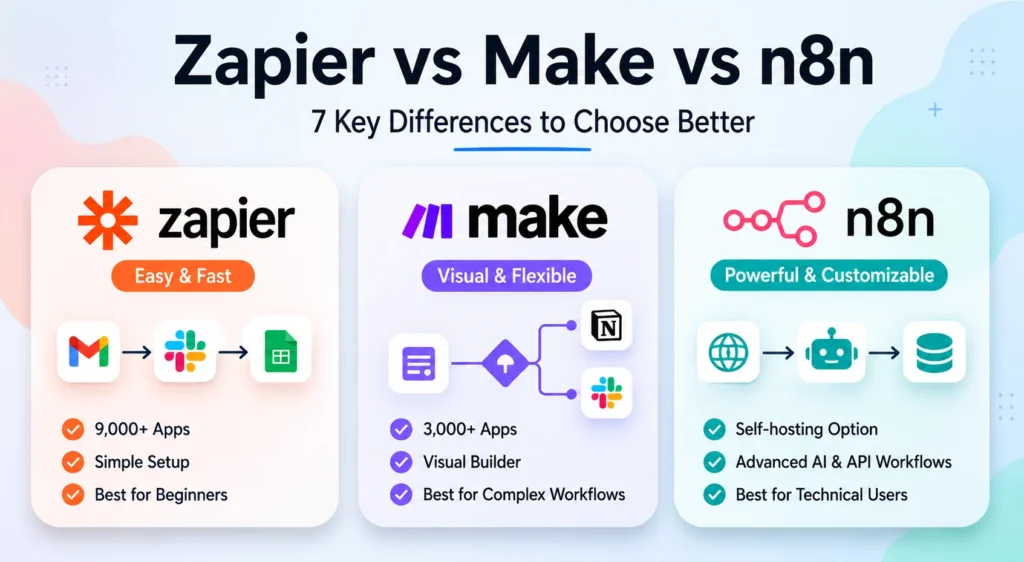
Zapier’s free plan includes 100 tasks a month and unlimited “Zaps,” but each Zap is limited to two steps — one trigger, one action. That rules out most multi-step automations (like lead arrives → enrich → add to CRM → notify Slack), which is where Zapier’s real value usually sits.
Best for: One simple, low-volume automation — for example, forwarding new form submissions to email.
Limitation: The two-step cap makes it more of a demo than a working automation for most freelance use cases. If you need multi-step logic, see our guide to n8n with OpenAI or the platform comparison below.
Make.com (Free)
Make’s free plan gives 1,000 operations a month and up to two active scenarios, with a 15-minute minimum interval between scheduled runs. Unlike Zapier’s two-step limit, Make lets you build multi-step, branching automations from the start — you’re just capped on total monthly volume.
Best for: Freelancers who want more automation flexibility than Zapier’s free tier allows, without paying yet.
Limitation: 1,000 operations disappears fast in a workflow with several steps per run — often within one to two weeks of regular use.
n8n (Free, self-hosted)
n8n’s Cloud product doesn’t have a permanent free plan, but its Community Edition — the open-source version you run yourself — is completely free with no execution limits, full access to all integrations, and the complete AI Agent framework (OpenAI, Claude, and Gemini nodes included). The only real cost is hosting it, typically a few dollars a month for a small server.
Best for: Freelancers comfortable with a bit of setup who want unlimited automation without a monthly subscription. See our guide on how to use n8n with OpenAI for a walkthrough.
Limitation: Self-hosting means you handle updates and uptime yourself — it’s not a managed service.
Free AI Tools for Writing and Client Communication
Grammarly (Free)
Grammarly’s free plan is a permanent product, not a trial: grammar and spelling checks, basic tone detection, and 100 GrammarlyGO AI prompts a month, working across the browser extension, desktop app, and mobile keyboard. Full-sentence AI rewrites, plagiarism detection, and unlimited tone adjustment are Pro-only.
Best for: Proofreading client emails, proposals, and deliverables before sending.
Limitation: 100 AI prompts a month is fine for occasional rewrites, tight for daily heavy editing.
HubSpot Free CRM (with Breeze AI)
HubSpot’s free CRM tier supports unlimited users and up to a million contacts, with basic Breeze AI features like inline content drafting included at no cost. The autonomous Breeze Agents — prospecting, customer support, content generation at scale — require a paid Professional or Enterprise tier.
Best for: Freelancers who need a real CRM to track leads and clients without paying for one.
Limitation: The advanced AI agents freelancers might actually want (auto-drafted outreach, lead enrichment) sit behind a paywall.
Google AI Studio (Free Gemini API tier)
For freelancers comfortable with a bit of technical tinkering, Google AI Studio gives free, no-credit-card API access to Gemini models for prototyping — useful for building a simple custom script, testing a chatbot idea, or automating a repetitive text-processing task. Rate limits (requests per minute/day) are strict, and it’s meant for testing, not production traffic.
Best for: Developer-freelancers or technically minded solopreneurs prototyping small AI-powered tools for clients.
Limitation: Rate limits make it unsuitable for anything beyond testing and light personal use.
Practical Example
A freelance marketing consultant handling three retainer clients could realistically run most of their AI workflow on free tiers: Claude for drafting client reports and proposals, Perplexity for quick competitor research, Canva for social graphics, Otter.ai for transcribing weekly client calls, and n8n (self-hosted) to auto-post transcribed call summaries into a shared Google Doc. The only likely upgrade trigger is Otter’s 300-minute cap once client call volume passes roughly five hours a month.
Common Mistakes
- Assuming “free” means unlimited. Every tool on this list has a real cap — messages, credits, minutes, or operations. Check the number before building a workflow around it.
- Treating Zapier’s free plan like a real automation tool. The two-step limit blocks most useful workflows; Make or self-hosted n8n are better free starting points for anything multi-step.
- Using free-tier image generators for client work without checking IP terms. Leonardo’s free images are public by default — confirm ownership terms before using outputs commercially.
- Ignoring self-hosting costs. n8n’s Community Edition is free software, but it still needs somewhere to run.
Best Practices
- Match the tool to the task, not the other way around — don’t force one AI assistant to do research, writing, and design when three specialized free tools do each job better.
- Track your monthly usage against each tool’s cap (messages, credits, minutes) so you’re not caught mid-task.
- Keep sensitive client data out of tools where free-tier outputs are public by default (Leonardo, some Canva features).
- Revisit this list periodically — free-tier limits and included features change often; verify current numbers on each provider’s pricing page before relying on them for client work.
FAQ
Are any of these tools “free forever,” or will the limits eventually disappear?
All the free tiers listed here are permanent, not time-limited trials. But limits, credit amounts, and included features change fairly often — several tools on this list adjusted their free-tier limits multiple times in 2026 alone.
Which free AI tool should a freelancer start with?
If you only pick one, start with a general chat assistant (ChatGPT, Claude, or Gemini) for writing and brainstorming, since it covers the widest range of daily tasks.
Can I run a full freelance business on free AI tools alone?
For light to moderate use, yes — many freelancers comfortably combine several of these tools. Once you hit consistent volume (frequent client calls, daily automation runs, regular AI image generation), you’ll likely need to pay for at least one tier.
Do free plans require a credit card?
No — every tool listed here can be signed up for without payment details.
Conclusion
You don’t need a big software budget to run an AI-assisted freelance business in 2026. The free tiers above cover writing, research, design, video, voice, CRM, and automation — the core of most freelance workflows. Start with one or two tools that solve your most repetitive task, track where the free limits actually bite, and only upgrade once you’ve outgrown them with real, paying work.